Have your say and win a Penfriend XL Portable!

You could win a Penfriend XL Portable in our prize draw.
Penfriend Portable
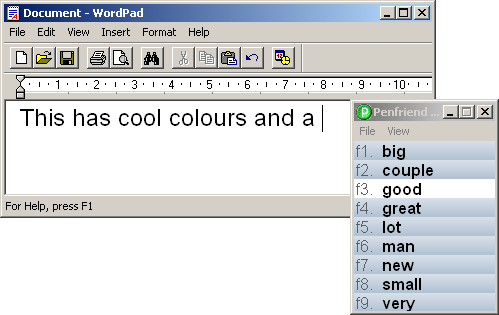
Penfriend is loved and used by thousands of people the world over. While we celebrate the fact that Penfriend has changed the lives of so many people by helping to overcome barriers, create independent and confident learners, we are not complacent and we won’t rest on our laurels!

Here at Penfriend we are always looking at ways in which we can continue to improve Penfriend, by making it more user friendly, easier to use while increasing its powerful features.

So we’re asking you, our customers to help us make improvements. It’s your chance to have your say. What it is you like about Penfriend? What do you use if for? Are there any specific features that you use? How does it help you? And how do you think we can make it even better?

To help us improve Penfriend please complete our online survey. It will only take a few of minutes of your time. The most interesting submission will win a Penfriend XL Portable.
Good luck!


Penfriend XL Version 4.1

Penfriend is delighted to announce that Version 4.1 is ready to download. Penfriend 4.1 offers new innovative features including:

• A Homophone option in the prediction window to support literacy
• Type on hover to help mobility for the on-screen keyboard
• Speak on hover to support typing with the on-screen keyboard
• A transparency option so you can see all your desktop Windows and icons when Penfriend is running and discretely use Penfriend without anyone knowing!

If you already have Penfriend XL version 4 then you can download the update for free via the website link in the copy of your program.

Homophone Support

Homophones, sometimes known as ‘confusables’, are words which have a similar sound but differ in spelling and meaning. Examples of homophones include ‘there’ and ‘their’, ‘where’ and ‘were’ and so on.

Confusable word hints

With over 400 homophones in the English language, similar sounding words add depth to a language but they can also be the cause of great frustration. Spell checkers can’t be relied upon where these troublesome homophones are concerned. Confusables are often highlighted by people who experience dyslexia as a source of annoyance and confusion as you could accidentally end up with a properly spelled word, but the wrong word!

With Penfriend’s new option ‘Confusable word hints’ (go to View and Preferences) you can now see and even hear the difference between confusable words, so there’s no excuse to get ‘pair’ and ‘pear’ or ‘bear’ and ‘bare’ mixed up anymore.

On-Screen Keyboard

Penfriend’s on-screen keyboard has always been a favourite feature with our customers, particularly those who use an alternative mouse such as a trackerball. With features such as ‘hover to click’ the on-screen keyboard has been greatly improved, offering increased accessibility and usability to our customers.

In Version 4.1 we improved the on-screen keyboard which now has an option to allows individual letters and function keys to be echoed or read back.

This is a particularly useful feature for individuals who are leaning to type such as early years or even those who are new to a computer and are learning to type. Speech feedback on the on-screen keyboard is also very beneficial to those who are struggling with literacy and require audio feedback to help scaffold their learning.

Transparency feature

And for those of you who’d rather be discrete about using Penfriend we’ve included a new transparent feature which means you can still see all your desktop windows and icons when Penfriend is running and you can use your favourite assistive technology without anyone else knowing….but you!


Penfriend's suite of literacy tools

When was the last time you looked at Penfriend? Penfriend features a comprehensive suite of literacy tools and so much more! Penfriend can support people of all abilities and ages.

If you have a literacy difficulty such as dyslexia then Penfriend can help with spelling and grammar. As well as predicting words when you type, Penfriend will read text aloud from websites, documents, in fact any Windows text-based program.


The Penfriend Blog

With the release of the new Penfriend Blog there are now video tutorials to get you up and running with Penfriend in no time at all. And if you’d like to keep up-to-date with what’s happening at Penfriend then you can follow us on Facebook and Twitter.


Who can Penfriend benefit?

Penfriend software benefits users who have dyslexia, visual impairment or physical disablilities, including Cerebral Palsy, Multiple Sclerosis, Motor Neurone Disease, Stroke, limb deformities and any condition which impairs the ability to write with a keyboard.

Penfriend helps users to write faster by predicting the next word they want to type, allowing faster writing for longer tasks, promoting better spelling and grammar and encouraging users to overcome low self esteem and become more confident writers.

Features include powerful word prediction, on-screen keyboard, screen reading, lexicon editing and the ability to learn new words as you type.

Penfriend Products


Penfriend XL

Penfriend XL


Penfriend XP

Penfriend XP

  • Word prediction.
  • On-screen keyboard.
  • Speech feedback.
  • English as a Second Language (ESL).
  • Learning of new words
  • Integrates with Clicker 5.2


Penfriend Portable

Penfriend Portable

  • Penfriend Portable comes on a USB memory stick.
  • No installation required.
  • Can be used on many computers.
  • Versions of all Penfriend products are available as "Portables".
  • High quality Cereproc Voices.